
Building Information Modeling (BIM) is the key to modern project delivery in the digital construction era. Nevertheless, the effectiveness of any BIM-driven project does not rest on the modern software and 3D modeling only; it rests on a well-organized, transparent, and collaborative plan. Such a plan is referred to as the BIM Execution Plan (BEP).
A proper BEP is the playbook of the project. It stipulates roles, workflows, standards, and deliverables – making all stakeholders aware of how BIM is going to be deployed, coordinated, and managed across the lifecycle of the project.
You will find out how to write a powerful BIM Execution Plan (BEP), what must be found in it, the best practices in each step, and a ready-to-use BEP template to kick-start you.
What Is a BIM Execution Plan (BEP)?
A BIM Execution Plan (BEP) is a formal document that is used to explain how processes of Building Information Modeling will be undertaken within a project. It establishes the extent of BIM application, team member roles, the way teams should cooperate, software specifications, and the interchange.
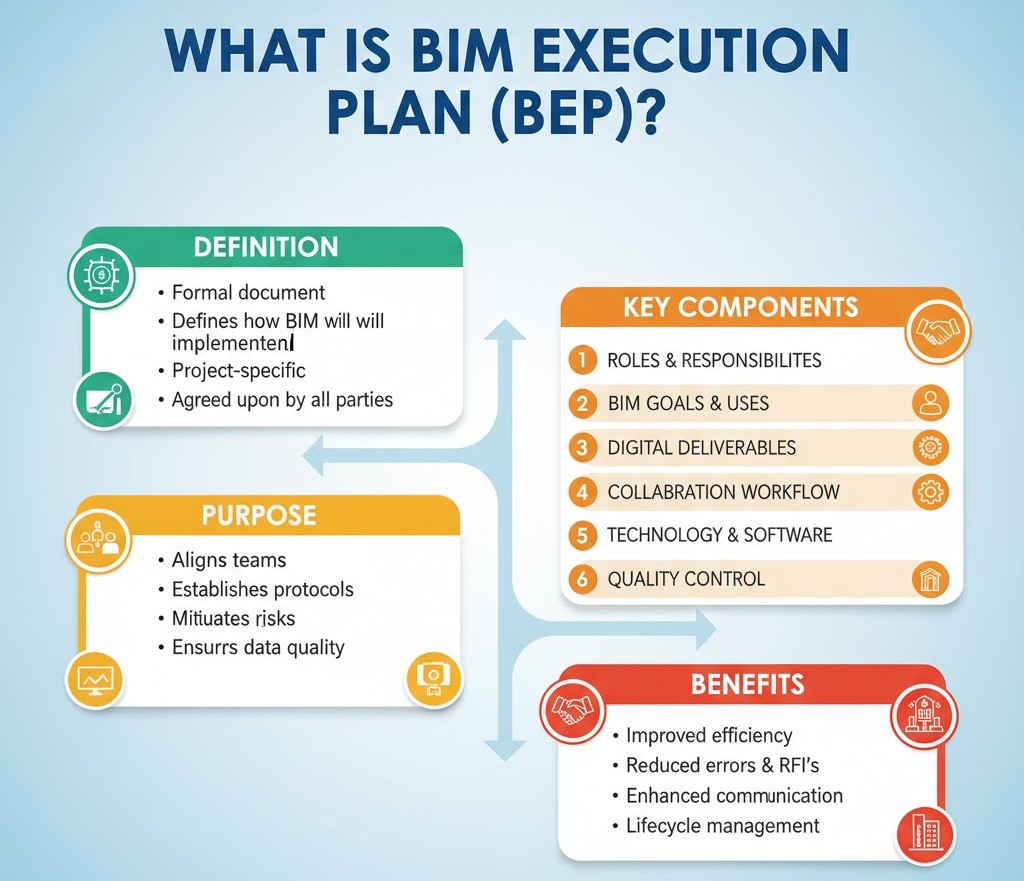
In short, the BEP answers the question:
“How will BIM be implemented successfully on this project?”
The BEP provides:
- A BIM coordination and data management roadmap.
- Proper expectations among participants of the project.
- BIM-based outcomes are measurable and have deliverables.
The most sophisticated BIM teams may experience a communication breakdown, inconsistency in models, and inefficiencies in the project in the absence of a robust BEP.
Why Is a BIM Execution Plan Important?
A BIM Execution Plan makes sure that all the people, including the architects and engineers, contractors and owners, work within one digital framework.
Key Benefits of a BIM Execution Plan:
- Improved Collaboration: Aligns multidisciplinary teams on BIM goals and processes.
- Reduced Errors: Minimizes data loss, duplication, and miscommunication.
- Standardized Workflows: Ensures consistency in modeling, coordination, and documentation.
- Increased Efficiency: Streamlines design coordination and reduces rework.
- Better Decision-Making: Provides clarity and transparency across the project lifecycle.
In essence, a well-developed BEP is the foundation for a successful BIM-enabled project, guiding teams from initial design to facility management.
When Should You Develop a BEP?
There are two primary stages when a BIM Execution Plan is developed:
Pre-Contract BEP
The Pre-Contract BEP was developed at the tender or proposal stage and defines how the organization was going to do BIM. It shows how the project team is going to address the Information Requirements (EIR) of the Employer and deliver the project in accordance with the BIM standards.
Post-Contract BEP
After the contract award, the Post-Contract BEP, based on the pre-contract one, is elaborated. It outlines particular steps, functions, software system platforms and model coordination plans agreed to by all stakeholders.
Both versions work hand-in-hand:
- Pre-Contract BEP = proposal and planning.
- Post-Contract BEP = execution and delivery.
How to Write a Powerful BIM Execution Plan (BEP)
Creating a BEP requires careful planning, collaboration, and attention to detail. Below is a step-by-step breakdown to help you write a clear, effective, and professional BEP for any project.
Step 1: Define the Project Information
Start with the project’s basic information. This sets the context for all subsequent BIM planning.
Include:
- Project name and location
- Client and stakeholders
- Project value and timeline
- Project delivery method (e.g., Design-Build, EPC, PPP)
- Key contacts and roles
It’s also good practice to summarize the project goals, such as improving design coordination, enhancing sustainability, or reducing lifecycle costs.
Tip: Keep this section concise but comprehensive; it’s the foundation for everything that follows.
Step 2: Identify BIM Objectives and Uses
This section answers the question: “Why are we using BIM on this project?”
Define the primary BIM uses relevant to your project, such as:
- Design authoring and visualization
- Clash detection and coordination
- 4D construction sequencing
- 5D cost estimation
- Facility management integration
- Energy and performance analysis
Each BIM use should have a measurable objective.
For example:
“Use BIM for clash detection to reduce design conflicts and RFIs by 40% before construction begins.”
By setting clear objectives, you ensure the BEP aligns with project outcomes.
Step 3: Establish Project Roles and Responsibilities
Collaboration is at the heart of BIM, so clearly defining who does what is essential.
Common BIM roles include:
- BIM Manager: Oversees BIM implementation and compliance.
- BIM Coordinator: Handles model integration and clash detection.
- Model Authors: Create and maintain discipline-specific models.
- Information Manager: Manages data exchange and file version control.
- Project Manager: Ensures timelines and deliverables are met.
Include an Organizational Chart to visually display team hierarchy and communication channels.
Tip: Assign accountability for each task, e.g., who submits models, who reviews them, and who approves final data.
Step 4: Define BIM Standards and Protocols
Consistency is key to successful BIM coordination. In this section, specify the standards, naming conventions, and modeling guidelines to be followed throughout the project.

Include:
- Model naming conventions and file structures
- Level of Development (LOD) standards, e.g., LOD 100–500
- Coordinate systems and project origin points
- Model accuracy tolerances
- Data exchange formats (IFC, RVT, NWD, COBie, etc.)
- BIM software versions (Revit, Navisworks, Archicad, etc.)
You may also reference applicable standards like:
- ISO 19650 (International BIM Standard)
- PAS 1192 (UK BIM Standard)
- NBIMS (US National BIM Standard)
A unified standard ensures every participant delivers data in a compatible and predictable manner.
Step 5: Detail the Model Development Plan
A strong BEP must describe how models will be developed, shared, and validated during each project phase.
Include:
- Model creation schedule timeline for each discipline’s model.
- File sharing frequency—e.g., weekly or biweekly exchanges.
- Model element responsibilities which team models which element.
- LOD progression expected detail level at schematic, design, and construction phases.
- Model review and approval process.
This section ensures all disciplines work at the same pace and deliver consistent models throughout the project lifecycle.
Step 6: Establish the Collaboration and Data Exchange Strategy
BIM thrives on collaboration, so your BEP must explain how information will be shared and managed.
Include:
- Common Data Environment (CDE): The central digital platform (e.g., Autodesk BIM 360, Trimble Connect, or SharePoint) where all models, drawings, and documents are stored.
- Data exchange workflow: Uploading, versioning, approval, and revision procedures.
- Model sharing protocols: Who uploads, who reviews, and who approves updates.
Also specify data security and access levels, defining permissions for different stakeholders to prevent accidental deletions or unauthorized changes.
Step 7: Define Clash Detection and Model Coordination Process
This is a crucial component of the BIM Execution Plan.
Describe:
- Frequency of clash detection tests (e.g., every two weeks).
- Software used (e.g., Navisworks Manage, Solibri).
- Tolerance limits for identifying clashes.
- Clash reporting formats and naming conventions.
- Resolution workflow: Assign responsibility, review, and approval steps.
Documenting this ensures the project team maintains a proactive approach to identifying and resolving issues early, before construction begins.
Step 8: Outline the 4D, 5D, and 6D BIM Implementation (If Applicable)
If your project includes advanced BIM dimensions, explain how they’ll be utilized:
- 4D BIM (Scheduling): Linking model elements to project timelines for construction sequencing.
- 5D BIM (Costing): Integrating quantity take-offs and cost data for real-time budget analysis.
- 6D BIM (Facility Management): Adding asset information for post-construction maintenance and lifecycle management.
This section helps align the BEP with long-term project goals, not just design and construction, but also operation and maintenance.
Step 9: Define Quality Control and Validation Procedures
Quality assurance is integral to BIM success. Your BEP should clearly define how models will be validated for accuracy, compliance, and completeness.
Include:
- Model review checklists
- Automated validation tools (e.g., Solibri, Dynamo scripts)
- Approval workflows for model submissions
- Version tracking and documentation control
Goal: To ensure every deliverable meets the agreed-upon standards and objectives before being shared or published.
Step 10: Establish Model Handover and As-Built Procedures
The BEP should explain how final models will be prepared for handover to the client or facility manager.
Define:
- Final deliverables: Model formats (e.g., IFC, COBie spreadsheets, Revit files).
- Metadata requirements: Equipment tags, serial numbers, warranty info, etc.
- As-built updates: Procedure for incorporating field data or redlines.
- Delivery timeline and approval process.
This ensures the client receives a comprehensive digital twin that supports long-term facility operations.
Step 11: Include BIM Execution Plan Templates and Examples
A BEP is easier to understand and implement when supported by visual aids and templates.
Your BEP may include:
- BEP Summary Table (objectives, tools, roles).
- Model Coordination Workflow Chart.
- LOD Matrix Template.
- Clash Detection Log Template.
- Model Submission Checklist.
Providing these templates streamlines project execution and ensures consistency across teams.
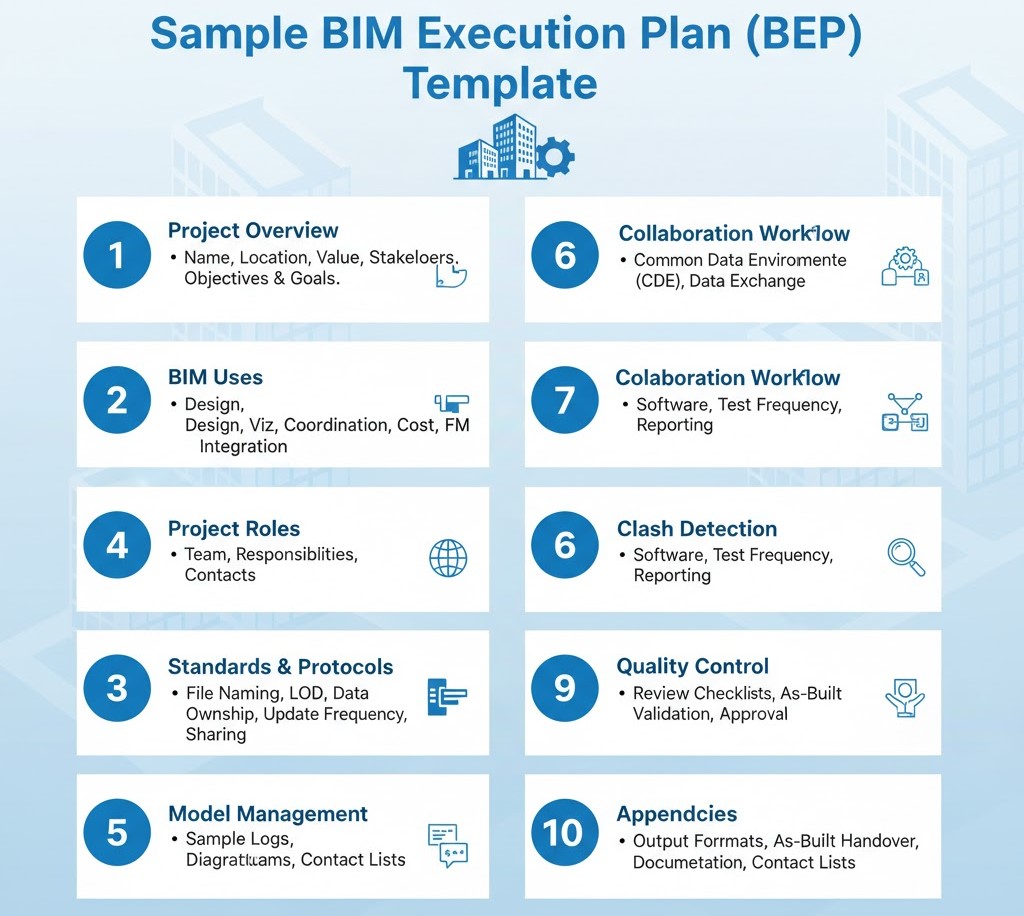
Sample BIM Execution Plan (BEP) Template
Here’s a simplified BEP Template structure you can adapt to your project:
1. Project Overview
- Project name, location, value, and stakeholders.
- Key project objectives and BIM goals.
2. BIM Uses
- Design modeling, visualization, coordination, cost estimation, FM integration.
3. Project Roles
- List of BIM team members with responsibilities and contact details.
4. Standards and Protocols
- File naming conventions, LOD definitions, and data formats.
5. Model Management
- Model ownership, update frequency, and sharing process.
6. Collaboration Workflow
- Common Data Environment (CDE) details and data exchange protocols.
7. Clash Detection
- Software used, test frequency, and reporting process.
8. Quality Control
- Review checklists, validation steps, and approval workflow.
9. Deliverables
- Final output formats, as-built handover procedures, and documentation.
10. Appendices
- Sample logs, workflow diagrams, and contact lists.
This structure ensures all key BIM coordination elements are covered, making your BEP both comprehensive and practical.
Best Practices for a Successful BIM Execution Plan
- Collaborate Early: Involve all stakeholders, especially subcontractors, during BEP creation.
- Keep It Dynamic: Update the BEP regularly as the project evolves.
- Focus on Clarity: Use visual diagrams, flowcharts, and tables for easy reference.
- Maintain Consistency: Follow global standards like ISO 19650 for uniformity.
- Review Frequently: Conduct regular BEP review meetings to ensure compliance.
- Train the Team: Ensure everyone understands the BEP content and their role within it.
A BEP is a living document, not a one-time submission. Treat it as the foundation for effective project management throughout all BIM stages.
Conclusion
Any successful project being driven by BIM is anchored on a BIM Execution Plan (BEP). It converts intricate teamwork into clear, open, and goal-oriented teamwork.
A clear BEP will make sure that your whole project team is working productively towards a shared vision through defining roles and standards, data handling, and handover. You may be synchronizing architectural models or dealing with construction data; a robust BEP is what is required to ensure the bridge between design intent and real-world execution.
Ready to Elevate Your BIM Strategy? Partner with Strand Co
At STRAND Consulting here in Hauppauge, NY, we take pride in providing BIM implementation, coordination, and documentation services that bring precision, efficiency, and innovation to every project we handle. Whether you’re a local contractor, architect, or construction manager, our goal is to help you streamline your workflow and ensure every design detail aligns perfectly with your project’s vision.
If your project requires a custom BIM Execution Plan (BEP) tailored to your unique objectives, technical requirements, and complexity level, our experienced team is here to help. We specialize in creating BEPs that promote seamless collaboration and communication from start to finish, ensuring your team stays on the same page throughout the entire process.
You can reach us at (631) 805-3179 or visit us at 490 Wheeler Rd, Suite 108, Hauppauge, NY 11788, USA — find us on Google Maps.