
Summary
BIM 360 is a cloud tool from Autodesk for construction and design teams. It helps teams manage drawings, files, 3D models, field reports, quality checks, safety records, and project issues in one shared place.
Many people search for bim360 because they want to know what it does, who uses it, and whether it still makes sense for their projects. This article explains BIM 360 in simple words and shows how it can help a real construction team.
5 Key Takeaways
- BIM 360 helps teams keep project information in one cloud space.
- It is used for drawings, documents, models, issues, RFIs, quality, and safety work.
- It can reduce mistakes caused by old files or poor communication.
- Contractors, architects, engineers, BIM managers, and field teams often use it.
- Autodesk Forma is now the newer Autodesk platform, so new projects should check current Autodesk tools before choosing.
Introduction
Construction projects need clear and current information. A small mistake can lead to extra cost, delay, or rework. For example, a site worker may use an old drawing. A subcontractor may miss a design change. A project manager may not know that a field issue is still open.
These problems often happen when project data is spread across email, paper files, phone photos, and many software tools.
BIM 360 helps solve this problem by giving teams one shared place to manage project files and daily work. It is not just a file storage tool. It helps people work from the same information and track what needs to be done.
What Is bim360?
BIM 360 is cloud-based construction software from Autodesk. It helps project teams manage building information and construction workflows online.
BIM means Building Information Modeling. BIM is the process of using digital building data. BIM 360 is one tool that helps teams manage that data and share it with the right people.
In simple words, bim360 helps answer this question:
Is everyone working from the right project information?
This matters because construction teams often work from different places. Some people are in the office. Some are on the jobsite. Some work for other companies. BIM 360 helps keep them connected.
Why Teams Use BIM 360
Construction work changes often. Drawings get updated. Models change. Field teams find problems. Managers need reports. Owners need records. Without one clear system, this work becomes hard to track.
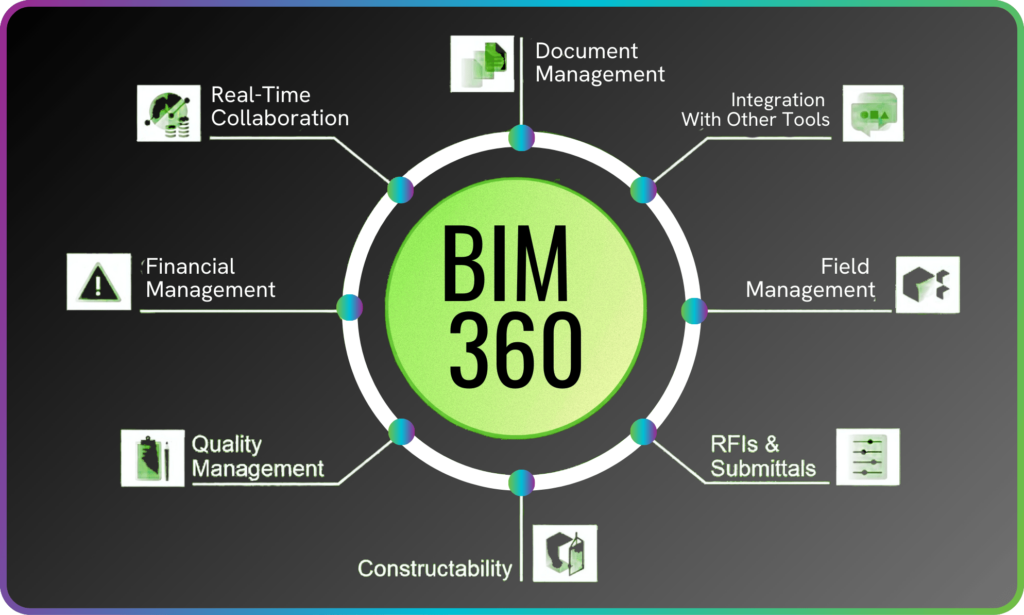
Teams use BIM 360 to manage project information in a cleaner way. It helps with document control, model coordination, issue tracking, field reports, quality checks, safety work, RFIs, and submittals. The goal is simple: help people make better decisions with current project data.
Main BIM 360 Features
Document Management
One of the main uses of BIM 360 is document management. A construction project can have many drawings, specs, reports, photos, and model files. BIM 360 helps store these files in a clear folder system.
It also helps with version control. This means users can see which file is current. That is important because old drawings can cause wrong work, delays, and rework.
A good system document management plan should make files easy to find, easy to review, and hard to misuse.
Drawing Access on Site
Site teams need quick access to drawings. BIM 360 can help workers open drawings on a phone or tablet.
They can view plans, check updates, add markups, and share notes from the field. This helps reduce confusion between the office and the jobsite. It can also reduce the need to carry large sets of printed drawings.
Model Coordination
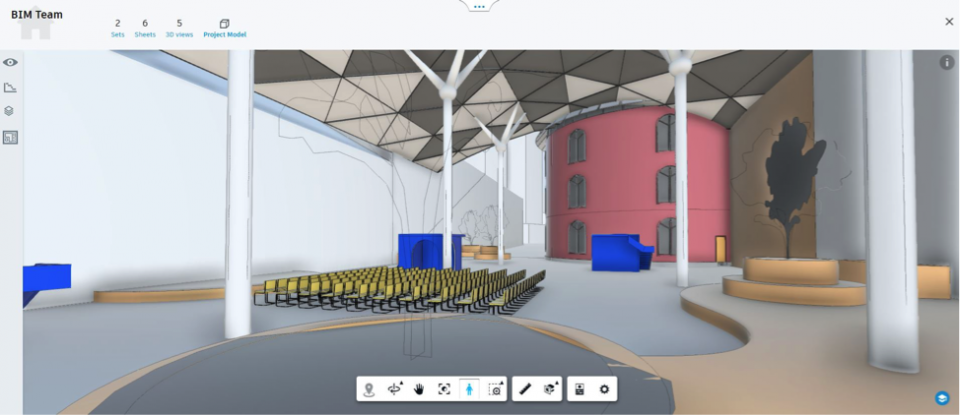
BIM 360 can help teams review 3D building models. This is useful when many building systems need to fit together. These systems may include structure, HVAC, plumbing, electrical, and fire protection.
For example, a pipe may run through the same space as a beam. Finding this issue in a model is better than finding it after work starts on site.
Issue Tracking
BIM 360 helps teams create and track issues. An issue can be a site defect, design question, missing detail, safety risk, or model clash. A user can add a photo, mark the location, assign the issue to a person, and set a due date.
This makes follow-up easier. The team can see what is open, who owns it, and what has been fixed.
Quality Control
BIM 360 can help with quality checks and punch lists. A site manager can inspect work, fill out a checklist, take photos, and assign items that need fixing. This gives the team a clear record of what was checked and what still needs work.
Good records also help during project closeout.
Safety Management
BIM 360 can support safety reports and checklists. Teams can record safety observations, site risks, and follow-up actions. A cloud system does not replace good safety training, but it can help keep safety work organized.
When records are easy to find, teams can act faster.
RFIs and Submittals
Many construction projects use RFIs and submittals. An RFI is a request for information. It is used when the team needs a clear answer about a drawing, detail, or project requirement.
A submittal is a file or item sent for review. It may be a shop drawing, product sheet, sample, or test report. BIM 360 can help manage these steps so the right people can review and respond.
Common BIM 360 Terms
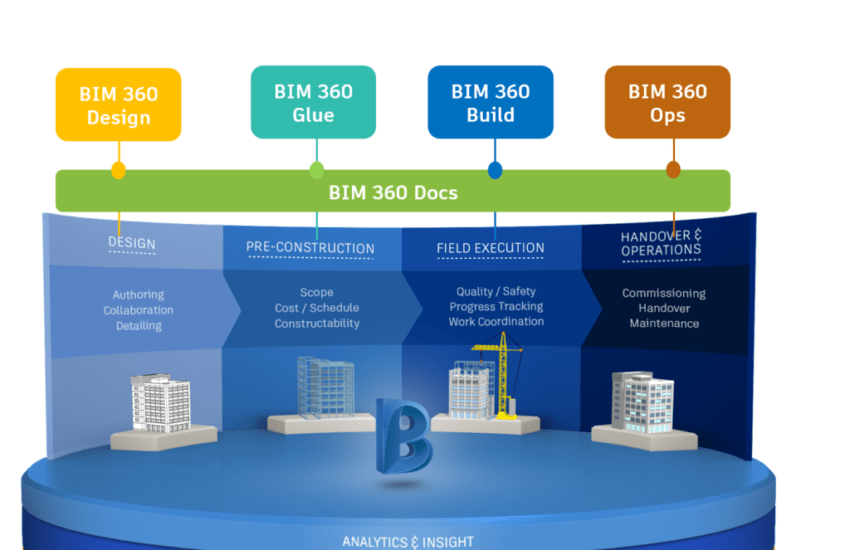
Autodesk has used different BIM 360 product names over time. Some names have changed, but many teams still use them in old projects, training files, or company workflows.
| BIM 360 Term | Simple Meaning | Common Use |
| BIM 360 Docs | Document control tool | Drawings, files, specs, and versions |
| BIM 360 Build | Field and project tool | Issues, quality, safety, and reports |
| BIM 360 Design | Design collaboration tool | Cloud model sharing and teamwork |
| BIM 360 Coordinate | Model coordination tool | Clash review and model issues |
| BIM 360 Field | Older field tool | Site reports, checklists, and tracking |
| BIM 360 Glue | Older coordination tool | Model review and coordination |
Who Uses BIM 360?
BIM 360 is used by many people in construction and design. Common users include architects, engineers, general contractors, subcontractors, BIM managers, VDC teams, project managers, site managers, safety teams, quality teams, and owners.
Each person may use BIM 360 in a different way. A site manager may use it for drawings and checklists. A BIM manager may use it for model review. A project manager may use it for RFIs, submittals, and issue tracking.
How bim360 Supports 360 Management
Good construction work needs a full view of the project. This is sometimes called 360 management because the team is not only looking at one part of the job.
They need to look at drawings, models, site reports, safety, quality, issues, and closeout records together. BIM 360 can support this wider view by keeping key project data in one cloud space.
For example, a project manager can check open issues. A site manager can review drawings. A BIM manager can look at model problems. A safety lead can track site observations.
This does not mean BIM 360 does all the work by itself. People still need clear rules, good training, and daily follow-up. But the tool can make the work easier to manage.
Benefits of BIM 360
Better Project Control
BIM 360 helps keep project data in one shared space. This makes it easier to find files, check updates, and track work. When the team knows where information lives, there is less guessing.
Fewer Old Drawing Problems
Old drawings are a common cause of mistakes. BIM 360 helps teams work from current files when the system is set up well. This can help reduce rework and improve trust between office and field teams.
Clearer Communication
Construction teams often lose time in long email chains. BIM 360 gives users a place to share updates, assign issues, and keep records. This makes it easier to see what changed and who needs to act.
Better Field Records
Photos, reports, checklists, and issues can be saved in the project system. This helps during the job and at closeout. Good field records can also help if there is a dispute or delay claim.
Faster Follow-Up
When issues are assigned to the right person, it is easier to check progress. The team can see what is still open and what has already been fixed. This helps reduce missed tasks.
BIM 360 and Autodesk Forma
BIM 360 is an earlier Autodesk cloud construction platform. Autodesk Forma is the newer Autodesk platform for design and construction work. This can be confusing because many people still say BIM 360. Many companies also still have BIM 360 projects, files, and workflows.
If your team already uses BIM 360 and the project is working well, you may keep using it for that project. If you are starting a new project, it is smart to review Autodesk Forma and current Autodesk product names before choosing a tool.
BIM 360 vs Autodesk Forma
| Area | BIM 360 | Autodesk Forma |
| Platform type | Earlier Autodesk construction cloud platform | Newer Autodesk design and construction platform |
| Common use | Existing projects and known BIM 360 workflows | Newer Autodesk cloud workflows |
| Users | Contractors, designers, BIM teams, field teams | Design, construction, and project teams |
| Best for | Teams already using BIM 360 | Teams planning new Autodesk workflows |
| What to check | Access, data, and team training | Current tools, pricing, and project fit |
This does not mean every team must move right away. The right choice depends on the project, team, client, and data needs.
When BIM 360 May Be a Good Fit
BIM 360 may be useful if your team needs better control over project files and field work. It may fit projects with many drawings, many subcontractors, frequent changes, model coordination needs, or strict quality and safety records.
It may also make sense if your company already uses Autodesk tools like Revit, Navisworks, or AutoCAD. BIM 360 can help small teams too, but only if the need is clear. A small team should check cost, setup time, and training before using it.
When to Review Other Options
BIM 360 may not be the best fit for every team. You may want to review other tools if you are starting a new project, need newer Autodesk tools, need stronger cost or schedule features, or have a client who asks for another platform.
Other tools may include Autodesk Forma, Procore, Oracle Aconex, Trimble Connect, Revizto, Dalux, Bluebeam, PlanRadar, or Bentley ProjectWise. The best tool is the one your team can use every day without adding confusion.
Practical Tips for Using BIM 360
Start With One Main Problem
Do not start by turning on every feature. First, decide what problem you want to fix. It may be old drawings, missing site photos, slow RFIs, poor issue tracking, or weak quality records.
Start with that problem first, then add more workflows later.
Keep Folders Simple
A messy folder system makes any software hard to use. Use clear folder names. Keep the structure simple. Make sure the team knows where to upload and find files. If users cannot find documents fast, they may go back to email or personal folders.
Set Clear Permissions
Not every user needs full access. Give each person the access they need for their role. This helps protect project data and keeps the system cleaner. Review permissions when new companies join the project.
Train People by Role
A field worker does not need the same training as a BIM manager. Teach each person what they need for daily work. Keep training short and practical. Show real project examples, not just software menus.
Treat Time as Real, Even When Plans Change
On a busy site, people may joke that time is a construct because plans change so often. But project dates, inspections, and handover deadlines are still real.
Use BIM 360 to track due dates, open issues, and review steps. This helps the team see what needs action now.
Review Open Issues Often
Issue tracking only works if the team checks it. Review open issues in project meetings. Ask who owns each item and when it will be closed. If issues stay open too long, the team may stop trusting the system.
Make BIM 360 the Main Source
If the team still sends key files by email, confusion can continue.
Make it clear where the latest drawings and records should live. One main source helps reduce mistakes.
Plan Handover Early
Do not wait until the end of the project to organize records. Set up handover folders early. Keep photos, reports, checklists, and closeout files clean from the start. This makes project closeout easier.
FAQs About BIM 360
What is BIM 360 used for?
BIM 360 is used for document management, model coordination, issue tracking, field reports, quality checks, safety records, RFIs, submittals, and project collaboration.
Is BIM 360 the same as BIM?
No. BIM means Building Information Modeling. BIM 360 is software that helps teams manage BIM and construction project data in the cloud.
Is BIM 360 still used?
Yes. Many teams still use BIM 360, especially on existing projects. Autodesk also now uses newer Forma branding for many design and construction cloud workflows.
Can BIM 360 help reduce mistakes?
Yes, it can help reduce some mistakes. It helps teams use current files, track issues, and keep better project records. But the team still needs clear rules and good habits.
Should I use BIM 360 or Autodesk Forma?
If your project is already in BIM 360 and working well, you may keep using it. If you are starting a new project, review Autodesk Forma and compare current tools.
Conclusion
BIM 360 helps construction teams manage project information in one cloud space. It can help with drawings, models, field reports, issues, safety work, quality checks, RFIs, and submittals. Its main value is simple: it helps people work from the right information.
If your team often loses files, uses old drawings, misses field issues, or struggles with model coordination, BIM 360 may help. If you are starting a new project, also review Autodesk Forma so you choose the current tool that fits your team.
Good software should make work clearer. It should help your team build with better records, fewer avoidable mistakes, and less confusion.