Summary
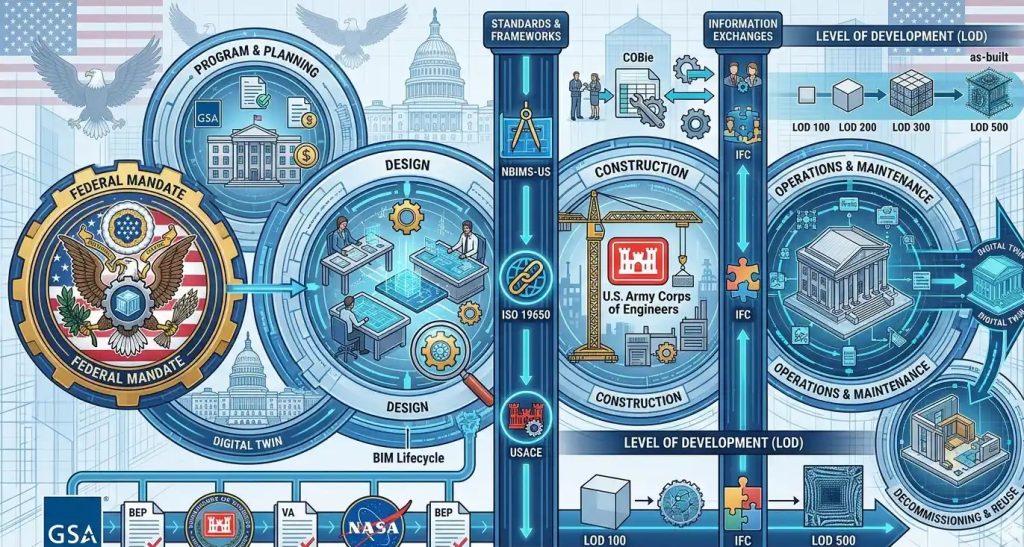
BIM compliance requirements for federal construction projects tell design and construction teams how to create, manage, check, submit, and hand over building information.
These rules can include BIM models, file names, clash reports, open model formats, COBie data, equipment data, record models, secure file sharing, accessibility checks, and closeout files.
There is no single nationwide BIM rule that applies to every federal project in the same way. The exact requirements depend on the federal agency, contract, project type, delivery method, and facility needs.
For contractors, architects, engineers, and BIM teams, the main goal is simple: understand the owner’s BIM rules before work starts, so the team can avoid rejected files, missing data, and closeout delays.
5 Key Takeaways
- BIM compliance means your model, data, files, and process match the contract.
- Federal BIM rules are agency-specific, not one-size-fits-all.
- A BIM Execution Plan is often one of the first BIM submittals.
- Open formats, COBie, CDE use, and asset data may be required when named in the contract.
- Security, accessibility, and closeout data should be checked early, not at the end.
Introduction
Federal construction projects often have strict BIM rules. These rules can affect bidding, design, coordination, construction, closeout, and facility handover.
For many teams, the problem is not making a 3D model. The problem is knowing what the federal owner expects from that model.
A team may ask: Is BIM required? Do we need a BIM Execution Plan? Is COBie part of the scope? Do we need IFC files? Who enters asset data? What should be in the record model? Can the government reject the BIM submittal?
These are real questions. Federal BIM work is often more formal than private-sector BIM work. The model may need to support design review, clash detection, space tracking, secure data exchange, accessibility review, facility management, and future maintenance.
This article explains BIM compliance requirements for federal construction projects in simple terms. It also shows what teams should check before they bid, design, coordinate, or submit BIM files.

What BIM Compliance Means
BIM compliance means your models, files, data, and workflow meet the rules in the project contract.
A model can look clean and still fail. It may fail because the file name is wrong, the model is not coordinated, the room data is missing, the COBie file is incomplete, the IFC export is not usable, or the record model does not show the final installed work.
On a federal project, BIM compliance may include design models, trade models, a federated model, clash reports, model-based drawings, equipment data, space data, COBie files, Facility Data Workbook files, IFC files, secure file sharing, and as-built model updates.
The most important rule is this: the contract controls the BIM requirements.
Federal agencies may publish BIM manuals, templates, and standards. But your team must follow the exact version and project rules named in the contract documents.
There Is No Single Nationwide Federal BIM Mandate
There is no one BIM rule that applies to every federal project in the same way. Instead, federal BIM requirements usually come from the agency, project contract, statement of work, specifications, submittal matrix, facility data templates, and security rules.
This matters because a team may complete one federal job successfully and still miss the mark on the next one. A GSA modernization project, VA medical center, USACE project, NAVFAC facility, and DoD building may all need BIM, but the required files and data can be very different.
The safest approach is to treat each federal project as its own BIM scope. Read the contract first. Then build the BIM process around that project’s rules.
Why BIM Matters on Federal Projects
Federal buildings are often large, costly, secure, or mission-critical. Many are used for decades. The owner needs clear building information that can support the full life of the facility.
BIM helps federal owners check design issues early, reduce field conflicts, review building systems, manage rooms and spaces, track equipment, and support maintenance after handover.
For example, the owner may not only want to see where an air handling unit is located. The owner may also need the asset tag, model number, serial number, warranty dates, room number, system name, and maintenance data.
That is why federal BIM compliance is both a modeling task and a data task.
Are BIM Requirements the Same for Every Federal Project?
No. BIM requirements are not the same for every federal job. Some projects have many BIM deliverables. Some have fewer. Small projects may not require BIM at all. The scope depends on the agency, building type, project size, delivery method, security needs, facility management needs, and contract language.
A GSA office project, VA medical center, USACE project, NAVFAC facility, and DoD project may all use BIM. But each one may ask for different files, data fields, model detail, review steps, and closeout records.
This is why teams should not rely only on past project habits. Each federal job needs a fresh review of the BIM scope.
Common Federal Agencies and BIM Focus Areas
The table below gives a simple view of how BIM needs can differ by agency. It is a starting point only. The contract should always be checked first.
| Federal Agency | Common BIM Focus | What Teams Should Check |
| GSA | Design review, space planning, facility data, model submittals, closeout support | P100, submittal matrix, project BIM rules, required model formats |
| USACE | Advanced Modeling, CAD/BIM standards, model files, coordination, geospatial data, record files | Contract specs, district rules, Project Execution Plan, Advanced Modeling requirements |
| NAVFAC | Facility data, equipment data, eOMSI, closeout records, secure handover | Facility Data Workbook, BIM rules, O&M data, project security rules |
| VA | Healthcare BIM, room data, equipment data, COBie, record models | VA BIM standards, Model Manager duties, asset data, facility management needs |
| DoD | Mission facility needs, UFC/UFGS rules, security, agency-led BIM standards | Contract package, UFGS sections, USACE or NAVFAC rules, CUI or ITAR controls if required |
Where Federal BIM Rules Usually Come From
Before work starts, the project team should collect all documents that control BIM compliance. The RFP may state if BIM is required and what files must be submitted. The statement of work may explain BIM duties for design, construction, coordination, and closeout.
The specifications may include rules for file formats, model quality, facility data, review steps, and final handover. The submittal matrix may show what must be sent at each project phase.
Many projects also require a BIM Execution Plan. This plan should explain how the team will meet the owner’s BIM rules. It should be written for the real project, not copied from an old job.
Main BIM Deliverables on Federal Projects
BIM deliverables change by project, but many federal jobs ask for several common items.
BIM Execution Plan
The BIM Execution Plan is often one of the first BIM submittals. It explains how the team will use BIM on the project.
It should name the BIM roles, model owners, software, file formats, naming rules, model coordinates, clash process, data process, review dates, and closeout plan.
A clear BIM Execution Plan helps the owner see that the team has a real process. It also helps the project team avoid confusion later.
Design and Discipline Models
Design models may include architecture, structure, civil, mechanical, electrical, plumbing, fire protection, security, telecom, and site work.
Each model should match the level of detail needed for that project phase. Early design may need less detail. Construction coordination and closeout may need more detail and more data.
Federated Model
A federated model brings several discipline models together. Teams use it to check fit, space, access, and system conflicts.
This model is often used during design review and construction coordination. It helps the team find problems before they become field issues.
Some people compare this type of workflow to “BIM Level 2,” where separate discipline models are shared and coordinated. In U.S. federal contracts, the exact phrase “BIM Level 2” may not be used. The contract may instead call for discipline models, a federated model, coordination reviews, file exchanges, and a project data environment.
Clash Detection Reports
A clash report shows where building systems conflict. A duct may hit a beam. A pipe may pass through a wall. Cable tray may block access to equipment.
A good clash report does more than list problems. It shows the issue, location, responsible party, due date, status, fix, and final check. The goal is not to create a long clash list. The goal is to solve conflicts before work is installed.
Model-Based Drawings
Some federal projects expect drawings to come from the model. This helps keep the drawings and model aligned.
If the drawings show one thing and the model shows another, the owner may ask for corrections. Teams should check both before each major submittal.
Open Formats and IFC Files
Some federal projects require open or interoperable model formats, such as IFC, along with native model files.
Open formats help the owner review, exchange, and archive model data without depending only on one software platform. They can also help with long-term access after the project team is gone.
But IFC is not automatically required on every federal project. It should be treated as required when the contract, submittal matrix, or agency standard names it.
If IFC is required, the team should test exports early. A model that looks correct in native software may not export cleanly. Room data, equipment data, object names, classifications, and coordinates should be checked after export.
Common Data Environment
Some federal projects use a Common Data Environment, or CDE, to manage BIM files, drawings, comments, submittals, and review records.
A CDE may be an agency system or an approved project platform. It helps keep files organized and gives the team one controlled place to share current information.
If a CDE is required, the team should confirm:
Who can upload files?
Who can approve files?
What naming rules apply?
What file status codes are used?
How are revisions tracked?
Can sensitive files be stored there?
Does the platform meet project security rules?
Do not assume that any cloud drive or file-sharing tool is allowed. Federal projects may have strict rules for where files can be stored.
COBie and Asset Data
COBie is used to hand over building asset data. It helps the owner move project information into facility management systems. COBie may include spaces, floors, zones, systems, equipment, spare parts, warranties, documents, and contacts. Even when COBie is not required, many federal owners still need structured asset data.
COBie is not mandatory for every federal project. It is required when the contract or agency standard asks for it. This data should not be collected at the last minute. It should be gathered during design, procurement, construction, commissioning, and closeout.
Facility Data Workbook
Some NAVFAC and DoD projects may use a Facility Data Workbook. This file tracks equipment and system data needed by the owner. If the workbook is required, treat it as a live project file. Waiting until the end of the job can lead to missing data, rushed reviews, and rejected closeout files.
Record Model or As-Built Model
At the end of the project, the owner may ask for a record model or as-built model. This model should reflect the final installed condition.
It should include approved changes, field updates, substitutions, and closeout information. This is much easier when the team tracks changes during construction instead of waiting until the end.
Security and Data Handling Requirements
Federal BIM files may include sensitive building information. This is especially important for defense projects, courthouses, border facilities, laboratories, secure offices, and mission-critical buildings.
The contract may include rules for Controlled Unclassified Information, Sensitive But Unclassified information, export-controlled technical data, ITAR, or other data handling needs.
This can affect how BIM files are stored, shared, transmitted, reviewed, and archived. Do not upload BIM files to a public or unapproved cloud platform unless the contract allows it. If the project requires a secure platform, confirm whether the system needs FedRAMP authorization, agency approval, access control, encryption, or other cybersecurity controls.
Security is not only an IT issue. It is also a BIM compliance issue. A project team can create the right model but still fail compliance if it shares files through the wrong system.
Accessibility and BIM Review
Accessibility is another important part of federal facility work. Many federal facilities must follow accessibility standards such as the Architectural Barriers Act Accessibility Standard, often called ABAAS. Some projects may also reference ADA-related requirements, depending on the facility and contract language.
BIM can support accessibility review by helping teams check:
Accessible routes
Door clearances
Ramp slopes
Elevator access
Restroom layouts
Turning spaces
Public counters
Parking and site access
Equipment access areas
BIM does not replace code review. But it can help the team find layout problems earlier, before they become field changes.
For example, a model review may show that a restroom turning space is blocked by a fixture, or that an accessible route is too narrow after equipment is added. Catching these issues early can save time and reduce rework.
BIM Data Requirements
Many BIM problems happen because teams focus on geometry and forget data. Federal owners often need asset data for maintenance, repairs, space planning, energy tracking, equipment replacement, and future renovation.
Asset data may include equipment name, asset ID, location, room number, system name, manufacturer, model number, serial number, warranty dates, O&M manual links, spare parts, and maintenance schedules.
A simple data responsibility matrix can help. It should answer four questions:
Who provides the data?
When is it due?
Where is it stored?
Who checks it?
This simple step can prevent many closeout problems.
Level of Development on Federal BIM Projects
Level of Development, or LOD, tells the team how much detail and data a model element needs at each phase. More detail is not always better. The right detail depends on how the model will be used.
Early design may only need massing, rooms, and basic systems. Design development may need major equipment and system zones. Construction coordination may need sleeves, hangers, access zones, and trade-level detail. Closeout may need final asset data and installed locations.
If the contract names LOD rules, follow them closely. If the rules are not clear, ask for written direction early.
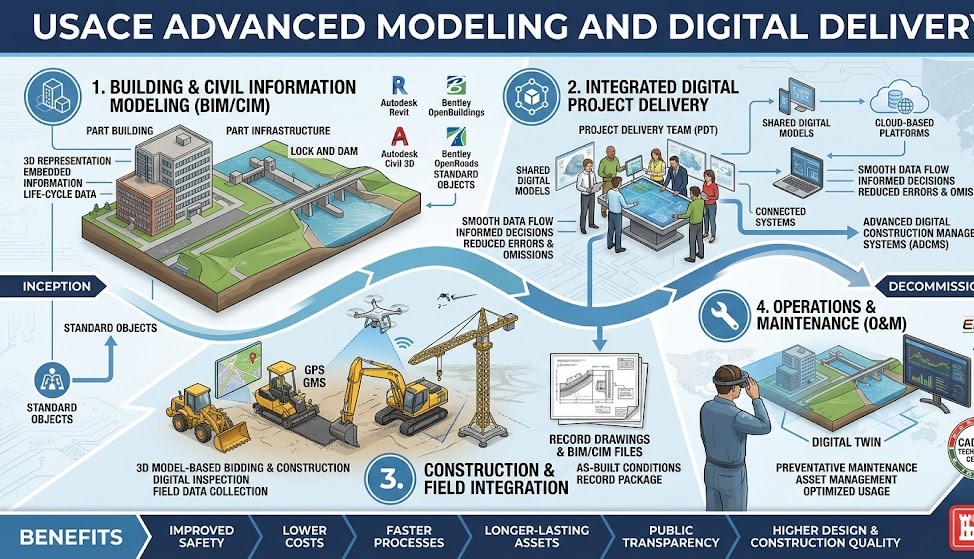
USACE Advanced Modeling and Digital Delivery
On USACE projects, BIM may be part of a wider digital process often called Advanced Modeling. This can include BIM, Civil Information Modeling, GIS, and CAD.
This matters because some USACE projects may need more than building model files. They may also involve geospatial data, civil model data, drawing files, facility data, and digital handover records.
Project teams should check the USACE contract requirements, district guidance, and project execution needs before they price or start the work.
Do not assume that USACE BIM only means a building model. On some projects, the digital scope may be wider.
Digital Twins and Facility Management
Some federal owners are moving toward better digital facility records and digital twin workflows. A digital twin is more than a 3D model. It is a digital record that may connect model geometry, asset data, maintenance data, sensors, and facility systems.
Not every federal project requires a digital twin. But many BIM requirements are moving in that direction because owners want useful data after construction.
For project teams, this means closeout data matters. Equipment names, room numbers, systems, warranties, and O&M links should be accurate enough for the owner to use after turnover.
Common BIM Compliance Mistakes
One common mistake is starting the model before reading the BIM rules. This can lead to wrong file names, wrong coordinates, missing data, or rejected submittals.
Another mistake is using a generic BIM Execution Plan. Federal owners want a plan that fits the project, agency, team, schedule, and data needs.
Teams also get into trouble when they wait too long to collect asset data. Equipment data should be collected when items are selected, ordered, installed, tested, and approved. Bad coordinates can also cause problems. They can affect site work, civil coordination, laser scanning, GIS, and future facility records.
A final common issue is a mismatch between models and drawings. If one changes, the other should be checked.
Practical Tips for Federal BIM Compliance
Read the contract before modeling starts. Look at the BIM section, submittal matrix, specifications, agency rules, and data templates. Make a simple list of every BIM item the owner expects.
Build a project-specific BIM Execution Plan. Name the team, tools, model uses, file formats, data needs, meeting process, and review steps. Keep it clear and practical. Set coordinates early. This helps with civil work, site layout, laser scanning, GIS, and future facility records.
Test open-format exports early if IFC or other exchange formats are required. Do not wait until the final submittal to find out that data is missing after export. Use the approved CDE or project platform. Confirm access rights, file naming, revision rules, and security controls before files are shared.
Start asset data collection early. Ask trade partners and suppliers for required data when equipment is selected and ordered. Do not wait until closeout. Check security rules before sharing files. Sensitive BIM files should only be shared through approved systems.
Use BIM to support accessibility review. Check clearances, routes, restrooms, ramps, doors, and other public areas early in design. Check models before each submittal. Look for missing links, wrong file names, coordinate issues, missing data, room name errors, and format problems.
Keep models and drawings aligned. If the model changes, check the drawings. If the drawings change, check the model. Get BIM changes in writing. If the team needs to change a BIM requirement, ask for written approval from the right project authority.
What Contractors Should Check Before Bidding
BIM can affect cost, staffing, schedule, software, trade coordination, security, and closeout work. Contractors should review the BIM scope before pricing the job.
Before bidding, ask if BIM is required, which agency standard applies, who leads BIM coordination, whether trade models are needed, whether clash detection is required, whether IFC files are required, whether COBie or a Facility Data Workbook is required, and who is responsible for asset data.
Also check if record models are required, what file formats must be submitted, how many BIM reviews are expected, whether a CDE is required, and whether digital files have security rules.
These questions help the team price the work more accurately and avoid surprises later.
When to Get BIM Support
Some teams can manage federal BIM compliance in-house. Others may need outside support, especially when the project has strict data rules, many trade models, tight deadlines, security limits, open-format exports, or a heavy closeout scope.
BIM support may help with model setup, BIM Execution Plans, clash coordination, IFC checks, CDE workflows, COBie checks, Facility Data Workbook updates, record model reviews, and closeout file checks.
The best time to get help is before the first BIM submittal. Waiting until files are rejected can cost more time and money.
FAQ
What are BIM compliance requirements for federal construction projects?
They are the BIM rules a project team must follow on a federal job. These rules may cover models, drawings, data, reports, open formats, COBie files, secure sharing, and closeout deliverables.
Is BIM required on every federal project?
No. BIM depends on the agency, project type, contract, and scope of work. Always check the project documents.
Is there one national BIM standard for all federal projects?
No. There is no single nationwide BIM mandate that works the same way for every federal project. BIM rules are usually agency-specific and contract-specific.
What is a BIM Execution Plan?
A BIM Execution Plan explains how the team will use BIM on the project. It covers roles, software, model uses, file formats, coordination, data, CDE workflow, and submittals.
Is COBie always required?
No. COBie is only required when the contract or agency standard asks for it. But many federal projects still need structured asset data.
Are IFC files always required?
No. IFC files are required when the contract, submittal matrix, or agency standard asks for them. Some projects may ask for native model files only. Others may require both native and open-format files.
Can a BIM submittal be rejected?
Yes. A BIM submittal may be rejected if the files, models, data, security process, or closeout records do not meet the contract requirements.
Can BIM help with accessibility compliance?
Yes. BIM can help teams check routes, clearances, ramps, restrooms, doors, and other accessible spaces. It does not replace code review, but it can help find issues early.
Conclusion
BIM compliance requirements for federal construction projects in the U.S. depend on the agency, contract, and project type. There is no single rule that fits every federal job.
Still, most projects need the same good habits. Read the contract. Follow the agency standard. Use a clear BIM Execution Plan. Keep models coordinated. Use approved file-sharing systems. Test open formats early. Collect data early. Check accessibility and security needs. Prepare closeout records before the final rush.
For federal work, BIM is not just a model. It is building information that must be clear, correct, secure, and useful for the owner after construction is done.